
Before your COD MW4 installation: confirm the purchase
Check your receipt or order history for the correct game, edition, platform and purchasing account. If the store asks you to buy again, resolve ownership before downloading a second copy.
Store ownership and in-game progression are separate. Linked accounts do not establish a license for another storefront; use the platform guide to check purchase conditions.
Find the correct installation in your platform library
Activision’s installation article supplies the platform-specific route. Use that source if menu labels differ from your current launcher. A physical console copy starts with the disc and may still require updates.
| Platform or store | Where to begin | What to confirm |
|---|---|---|
| Steam | Your library’s Call of Duty entry | Purchasing Steam account |
| Battle.net | The launcher’s game list | Modern Warfare 4 selected |
| Xbox app on PC | Your owned-game library | Installed-only filter cleared |
| Xbox Series X|S | Your full owned-game collection | Owning account and compatible console |
| PlayStation 5 | Your purchased-game collection | Correct PS5 purchase |
| Nintendo Switch 2 | Your purchased software and current download state | Preload plus required launch update |
COD MW4 installation on Steam
Activision identifies Call of Duty as the Steam library entry. If a download fails, record the client error before choosing transfer, storage or launch troubleshooting.
- Launch Steam and sign into the account associated with your purchase.
- Open Library and select Call of Duty.
- Choose Install and follow the client’s destination and download prompts.
- Finish the required downloads and updates, then start the mode you want to play.
Install MW4 through Battle.net
- Launch Battle.net and sign into your purchasing account.
- Open All Games and select Modern Warfare 4.
- Select Install and complete the launcher’s download and update prompts.
Install MW4 in the Xbox app on PC
When the game is absent from the list, first clear the Installed filter within the Play state filter. Activision specifically identifies that filter as a reason an uninstalled purchase can be hidden.
- Open the Xbox app using the account associated with your purchase.
- Select My Library and find Modern Warfare 4.
- Select Install, then complete the required download and updates.
Install a digital copy on Xbox Series X|S
- Open My games & apps, then choose See all.
- Open Full library and select All owned games.
- Choose Modern Warfare 4 and select Install all.
- Allow the required installation and updates to complete before starting the intended mode.
Install a digital copy on PlayStation 5
For a physical console copy, insert the disc and follow the console’s installation prompts. The official guide also notes that a Switch 2 eShop preload needs its launch update. Follow your current device and product instructions rather than reusing a PC launcher path.
- From the PS5 Games area, open Game Library.
- In Your Collection, select Modern Warfare 4.
- Choose Download and allow installation and required updates to complete.
Check content packs when a mode or launch button is missing
If the game opens but a mode is unavailable, record the message. Check the owning launcher or current content-management screen for missing mode content and pending updates, complete them, then retry.
Activision’s dated issue list describes an Xbox-on-PC case with no launch button in COD Home. It suggests checking Microsoft Store device management and missing MW4 content packs. Match that platform and symptom; other locked modes may have different causes.
Use pack labels and dependencies shown by your installation. No universal pack name or size is assumed here. Check dependencies and the launcher’s removal description before removing content.
Plan storage and download time using the right numbers
Use the launcher’s actual remaining transfer amount to estimate time, and its destination-drive requirement to assess installation space. These are separate checks.
If the launcher shows a hypothetical 40 GB remaining, enter 40 GB and zero already downloaded. Do not subtract completed data twice. Match GB or GiB, and convert MB/s to Mbps where needed.
Transfer estimates exclude installation, unpacking, queued updates and account access. If transfer has finished but installation continues, follow the launcher’s current stage rather than interrupting it because a calculator shows zero remaining time.
Choose the next step from the symptom you can observe
| What you see | Next useful check | What it does not establish |
|---|---|---|
| The store asks for another purchase | Check the receipt, signed-in account and platform product | It does not identify a damaged download |
| The download is queued, paused or incomplete | Finish or investigate the launcher’s current operation | It does not establish a server outage |
| A specific mode asks for content | Compare that message with installed content and pending updates | It does not automatically require buying another edition |
| There is no launch button on Xbox on PC | Read the current official issue entry for that symptom | It does not apply to every store or device |
| The client starts, then reports a connection error | Check the official game and platform services | It does not prove that local files need reinstalling |
| The completed PC installation closes immediately | Use the PC launch troubleshooting sequence | It is different from a stalled transfer |
A final check before your first session
If a problem remains, record the exact message and completed checks for official support.
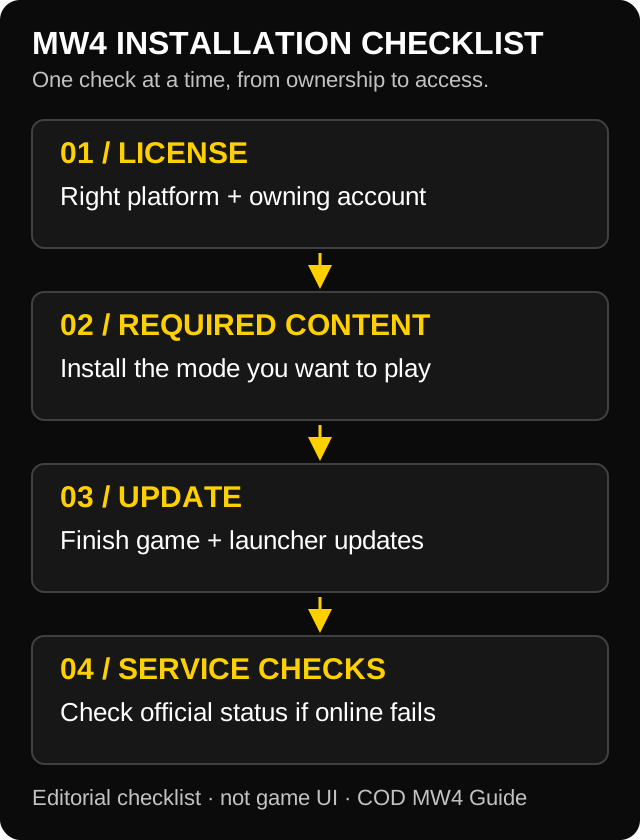
- The owning store recognizes the correct product on the correct account.
- The launcher has finished the required download and update operations.
- The content for the mode you intend to play is present.
- You can reproduce and record any remaining message exactly.
- If the game starts but online play fails, you have checked current service information.
COD MW4 installation FAQ
Why can I not find MW4 in the Xbox app on PC?
Check the purchasing account and whether the library is filtering for installed games. Activision’s installation article specifically notes that this filter can hide an uninstalled MW4 entry.
Does downloading Call of Duty mean every MW4 mode is ready?
Use the current installed-content and update state to check the mode you want. A library entry or launcher download alone is not a complete check of mode content and ownership.
Should I reinstall MW4 when a mode is locked?
First identify whether the message concerns ownership, required content, an unfinished update or connection. Record that distinction before choosing a large reinstall.
What download size should I enter in the calculator?
Enter the launcher’s actual remaining transfer amount and match its unit. Storage requirements may differ.
Page update history
- — Published the source-reviewed workflow and tightened repeated ownership, content-pack and download guidance while retaining platform steps and troubleshooting routes.
Sources and verification
These links support the factual information in this guide. Our planning advice is independent. Sources were checked . Source publication or update dates below belong to the linked source.
- Modern Warfare 4 installation and setup Activision Support · Updated
- Modern Warfare 4 known issues: October 23 source revision Activision Support · Updated
- Steam: update and installation issues Steam Support
Found an outdated detail? Send the source and the affected page. Read our editorial and corrections policy.